Sorting / Filtering SharePoint RSS feeds
 Ever wondered if it was possible to sort or filter the automatically generated SharePoint RSS feeds? Well I did and, as a matter of fact, I found a solution. The idea is very simple, you create the view that will filter or sort your list elements according to your needs. You then take the guid of your view and append it to the feed URL.
Et Voila !
Here is an example, let’s say I have a Task List (screenshot from a French MOSS farm, I am sure you’ll get the idea anyway) with some items pending, other finished. This status is defined in a “State” (Etat) column.
Ever wondered if it was possible to sort or filter the automatically generated SharePoint RSS feeds? Well I did and, as a matter of fact, I found a solution. The idea is very simple, you create the view that will filter or sort your list elements according to your needs. You then take the guid of your view and append it to the feed URL.
Et Voila !
Here is an example, let’s say I have a Task List (screenshot from a French MOSS farm, I am sure you’ll get the idea anyway) with some items pending, other finished. This status is defined in a “State” (Etat) column.
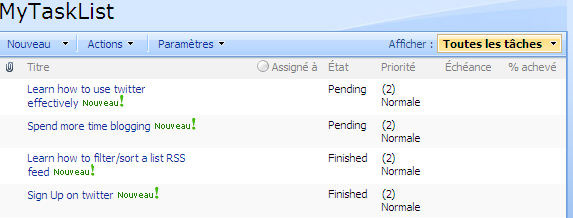 I first create two views filtering on the Etat column. One returns the pending elements, the other returns the finished elements.
I then take note of the guid of my two views (Editing the views and extracting the &View=….. part of the URL does the trick).
After making sure that RSS feeding is activated for my task list, I can go check the RSS feed at :
http://MyServer/_layouts/listfeed.aspx?List=a4a88bd0%2Ddf29%2D4f54%2Da924%2D195be47346ed
The results as displayed by IE7 looks like :
I first create two views filtering on the Etat column. One returns the pending elements, the other returns the finished elements.
I then take note of the guid of my two views (Editing the views and extracting the &View=….. part of the URL does the trick).
After making sure that RSS feeding is activated for my task list, I can go check the RSS feed at :
http://MyServer/_layouts/listfeed.aspx?List=a4a88bd0%2Ddf29%2D4f54%2Da924%2D195be47346ed
The results as displayed by IE7 looks like :
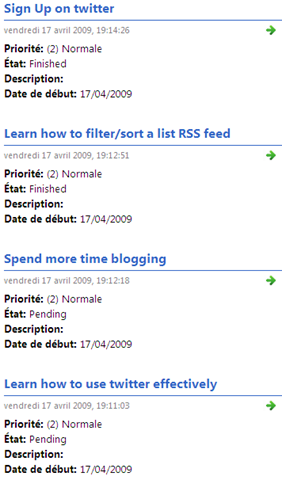 All the items are displayed whatever their status but let’s say that I want to see only the elements pending, so that I know what I need to work on. I just append
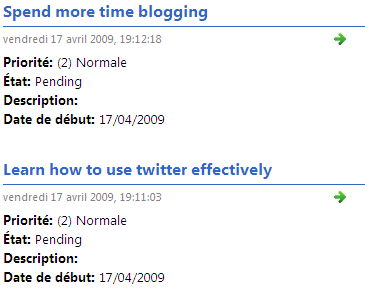
 "&View=<VIEW_GUID>" to the URL and here is the result :
http://MyServer/_layouts/listfeed.aspx?List=a4a88bd0%2Ddf29%2D4f54%2Da924%2D195be47346ed&View=%7B9F3ACEAB%2D75DF%2D4C04%2D83C2%2D3A5733A6CA31%7D
 By the way, I only tested this on a MOSS 2007 SP1 install. I would be interested to know if it works with WSS as well.
I wonder if this is documented anywhere as I stumbled upon this feature by pure chance ?
RSS picture credit Photopia on flickr
By the way, I only tested this on a MOSS 2007 SP1 install. I would be interested to know if it works with WSS as well.
I wonder if this is documented anywhere as I stumbled upon this feature by pure chance ?
RSS picture credit Photopia on flickr